THESE HAVE BEEN UPDATED (CLICK HERE)
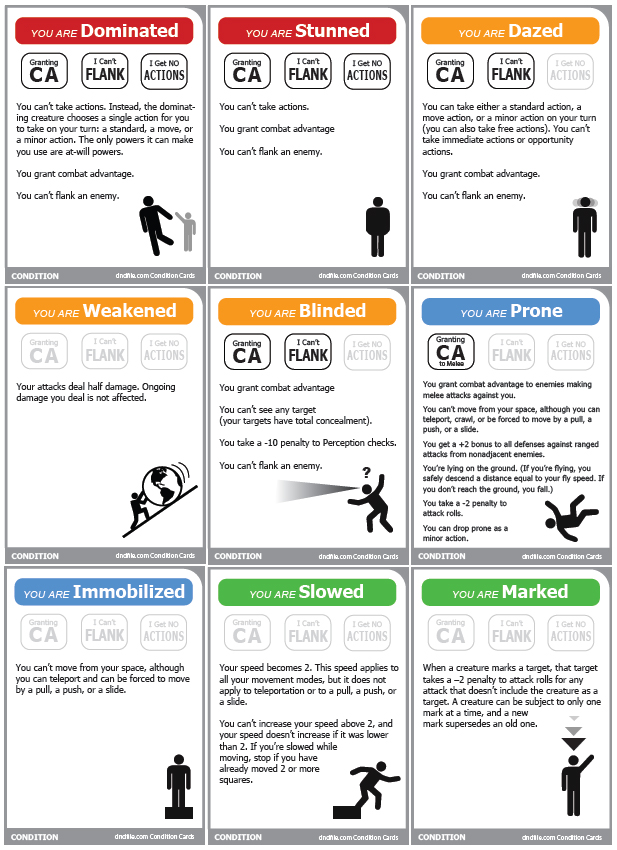
Here they are, 4th Edition D&D Condition Cards by Weem! These cards make not only tracking conditions a breeze, but they help players know what that condition means for their character with brief lists of the mechanics behind the condition!
Below you will find a list of the conditions that can be found on each page. Under those, the links to download the files! Click the image on the left to preview Page 1.
On Page 1
(1) Dominated, (1) Stunned, (1) Dazed, (1) Weakened, (1) Blinded, (1) Prone, (1) Immobilized, (1) Slowed, (1) Marked
On Page 2
(1) Dying, (1) Unconscious, (1) Helpless, (1) Surprised, (1) Petrified, (1) Restrained, (1) Deafened, (2) Ongoing Damage
NOTE: THESE HAVE BEEN UPDATED!!!
Get them here!
Or you can download the previous version here (though I don’t recommend it)…
Download: Page 1 [PDF], Page 2 [PDF]
Theses are fantastic and much more convient than the older condition cards I have been using. Thank-you.
Thanks for the message!
Great cards! Simple to read & informative too.
Nice cards. Consider them used by me very soon.
Also, I’m adding your site to my list on Stuffer Shack, and adding a link on the Gaming Tools page to these cards.
I like the background effect. Keep up the good work!
-Tourq
Excelent design with a touch of industrial srtyle!
Thanks, I’m gonna print’em for my next campaign!
The Ongoing Damage cards would be better if they noted the damage per turn. Otherwise, awesome! Thansk!
Sweet! Did you ever make something like this for 3.5?
Nope, I didn’t :/
These are great, thanks! The only issue I’m having with them is the bottom getting off when I go to print. Any suggestions?
@Kato: Hmmm… these have been downloaded a few thousand times now over the last few months and this is the first time I have heard of this. It does not happen to me either – so no, unfortunately I don’t have any suggestions other than to check your settings? 🙁
I found a work around by loading the PDF in Photoshop instead of Acrobat. The problem looks to be somewhat specific to my color printer–it’s offsetting the PDF by the top margin where it can’t print, so it ends up cutting off the bottom margin. Of course, I could also tell it to shrink to fit the page, but wanted to print it at 100%.
Anyway, I got it to work, just thought I’d mention it. 🙂
Really, really great and useful! Makes tracking much easier.
But please make one for “grabbed”! It’s the only thing we ever need to look up since we started using your cards.
grabbed creatures are immobilized.
These are great! My only comment is that there are some conditions that get used more than others (i.e. Dazed, Stunned, Restrained, Immobilized). Is it possible to create one page for each condition? This will give DMs the ability to select specific pages with more commonly used conditions. For example, a PDF page that just has the Stunned condition? If that’s too much to ask, do you have a quick tip on how to make this page myself? Thanks!
Nice work TheWeem!! Will be very handy for my group of new-to-4E players.
Also reminds me a bit of the warning notifications from Portal. 🙂
Very nice. Sharing these with my local gamers via The Windsor Gaming Resource. I love the way you have highlighted whether or not the character grants combat advantage, can fland and has actions. Those are the most often asked questions at my gaming tables regarding status effects.
@windsorgaming
Great stuff, beautifully laid out and worth downloading without hesitation to be printed forthwith. Much obliged.
Ab
I’ve been using these for months and it’s a great thing. Being the size of MtG cards means I can sleeve them, which makes them both easy to sort through and I can write on the sleeve with dry erase markers to note how much ongoing damage, etc.
The “Helpless” card isn’t accurate though. Helpless doesn’t inherently mean you can’t take actions and it doesn’t prevent you from flanking, since you are able to attack if you are simply helpless. There’s a power or two that makes someone helpless without being unconscious.
One card I would like if there ever is a third page would be some sort of catch-all Funky Effect card for some of the more unique effects. It’s just a reminder card that some critter has some non-standard mumbo-jumbo on them. I just toss players a blank card for these, but it’d be great to have a card in the same style.